
Dashboard
Your results and balances in one place, with filters by market, side, source and period.
The Dashboard is the first screen to open when you want to know how you are doing: how much you earned, how much is working in open trades, and what your accounts hold. It sums up everything you trade through Skyrexio, whether the trade came from the Terminal, a bot or the assistant.
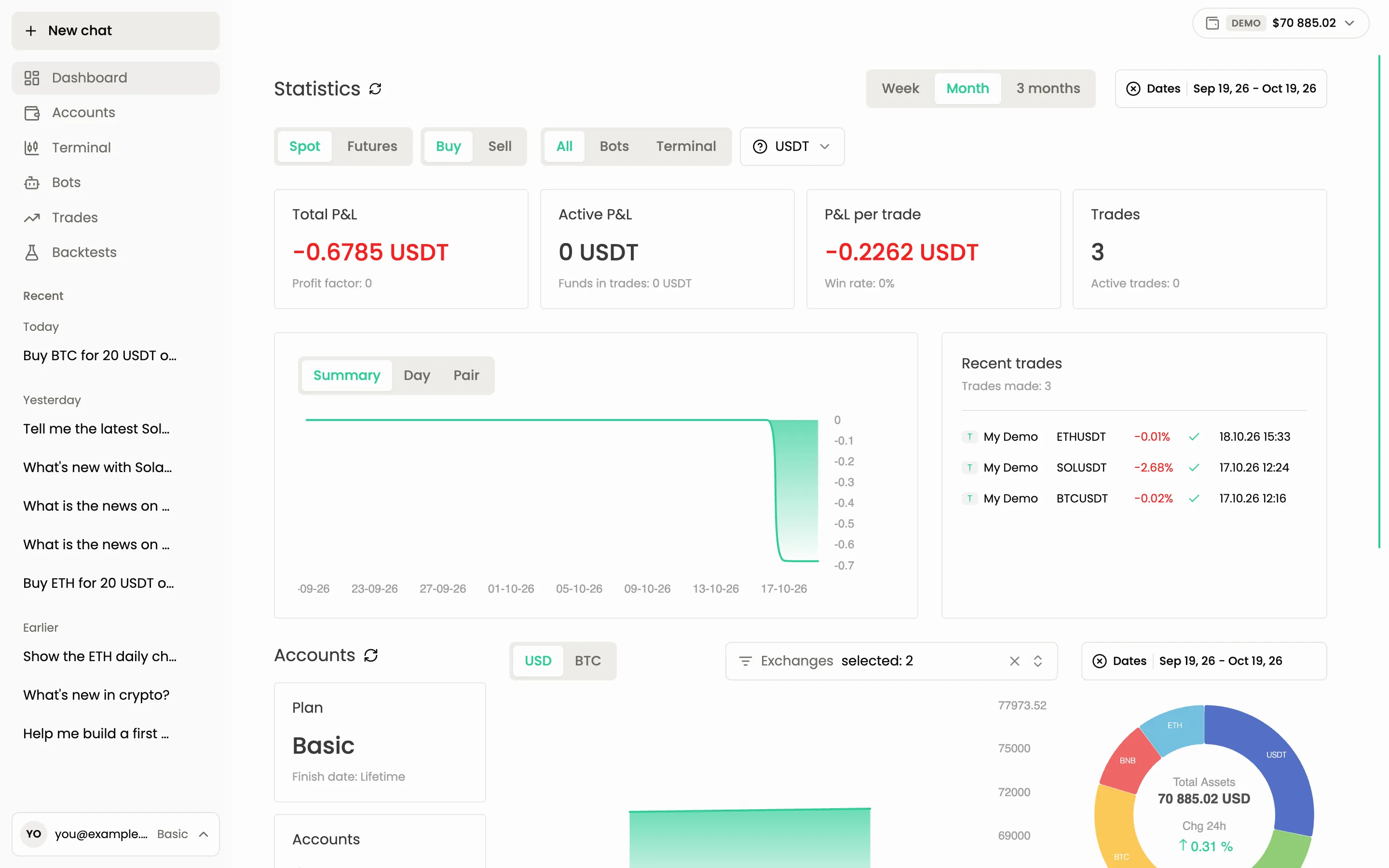
Statistics
The top block has four cards. Each one has a main number and a smaller line under it.
| Card | Main number | Line under it |
|---|---|---|
| Total P&L | Profit or loss of all closed trades in the selected period | Profit factor: gross profit divided by gross loss. Above 1 means the trades earned more than they lost |
| Active P&L | Current profit or loss of trades that are still open | Funds in trades: money locked in open trades and limit orders |
| P&L per trade | Average result of one trade | Win rate: the share of profitable trades |
| Trades | Number of trades in the period | Active trades: how many are open right now |
All four cards react to the filters below. If a number looks strange, check the filters first.
Filters
The filters sit above the cards and change every number and chart on the page.
- Week, Month, 3 months: the period. The Dates field next to them lets you pick exact dates.
- Spot and Futures: the market. Futures is disabled until you have a futures account.
- Buy and Sell: the side of the trades. On futures they become Long and Short.
- All, Bots, Terminal: where the trades came from. Trades opened through the assistant count as Terminal.
- The currency selector (for example USDT): the quote currency of the pairs you count.
On the spot market with the Bots source the side is fixed to Buy, and the Sell switch is disabled.
Chart and recent trades
The chart has three tabs:
- Summary: how your result changed over the period.
- Day: the result for each day.
- Pair: the result for each trading pair, to see which pairs earn and which lose.
Next to the chart, Recent trades lists the latest trades with the account, pair, return in percent, status and date. A small mark shows whether the trade came from a bot or from the Terminal.
Accounts and assets
The lower block, Accounts, shows your money:
- the Plan card with your plan name and its finish date, and the Accounts card with how many accounts you use out of the plan limit;
- a balance chart and a ring of your assets with the total value and the 24-hour change. Switch between USD and BTC, pick which exchanges to include, and choose the dates;
- the Assets table with the columns Token, Share, Chg 24h, Price, Amount and Total. Use the search box to find one asset.
The round arrow next to a block title refreshes its data.
Ask the agent instead
You can skip the filters and ask in plain words. The agent reads the same statistics.
How did I do this month? Show P&L and win rate for spot trades only
Why is my P&L negative?
Common questions
Why do the numbers differ from what I see on the exchange? The Dashboard counts only trades made through Skyrexio, and only within the selected period and filters. Trades you made directly on the exchange are not included.
Why is Active P&L zero? You have no open trades under the current filters.
Where is the demo account? Turn Demo mode on in the accounts panel at the top right. The Dashboard then shows the demo account. See Demo trading.
Still have a question?
Ask the agent in the app, or write to support in the chat at the bottom right.