
Backtests
The Backtests screen: your saved runs, unsaved runs, how to start a new one and how to read the result view.
A backtest replays a strategy on past prices and shows what it would have done. The Backtests section keeps your results in one list. How to run one is in Running a backtest, and how to read the numbers is in Reading results.
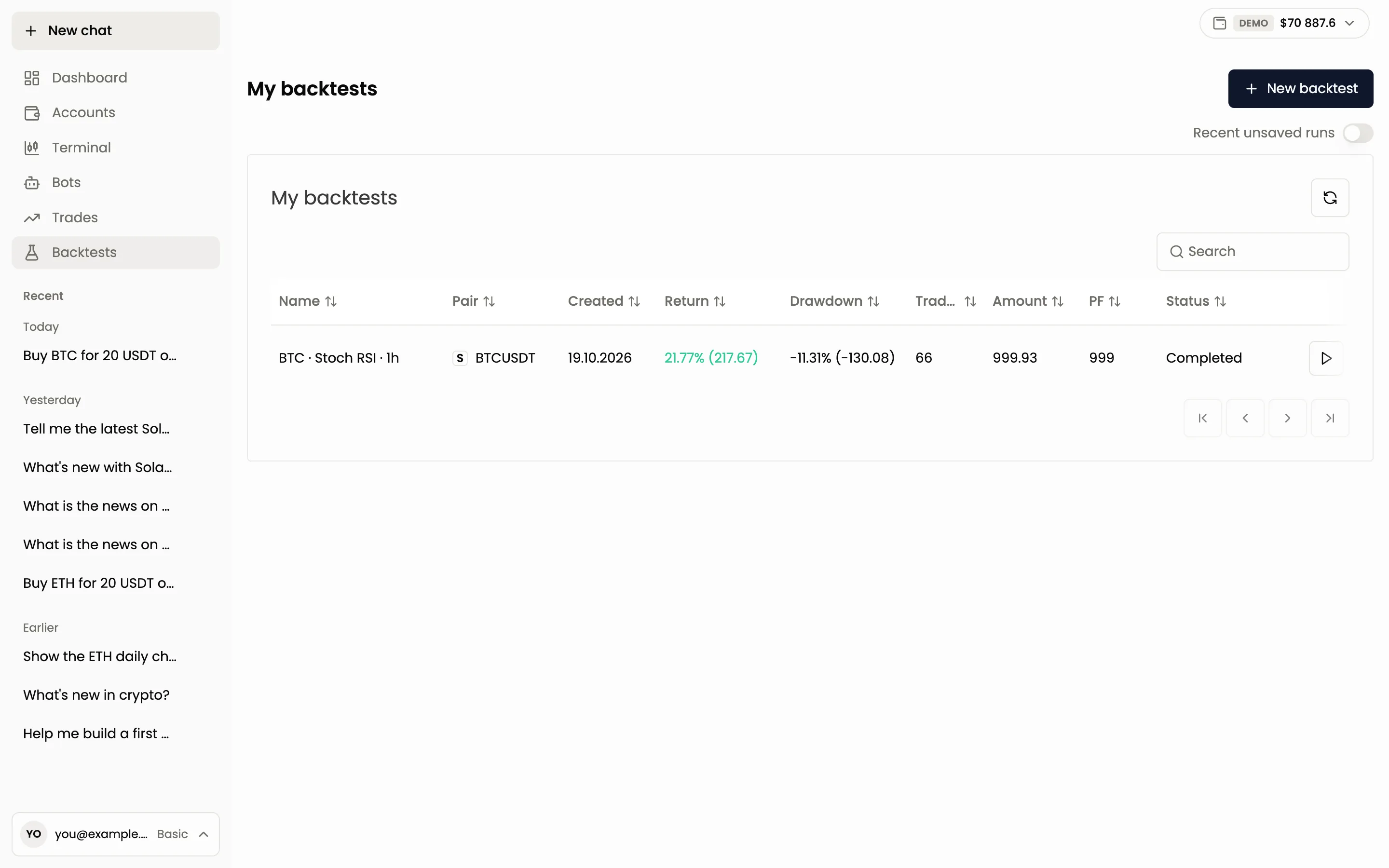
My backtests
The list has these columns:
| Column | Meaning |
|---|---|
| Name | The run name, for example the coin, the indicator and the timeframe |
| Pair | The trading pair |
| Created | The date of the run |
| Return | The result in percent and in money |
| Drawdown | The deepest drop from a peak, in percent and in money |
| Trades | The number of trades the strategy made |
| Amount | The balance of the run |
| PF | Profit factor |
| Status | Completed, Failed, Pending or Cancelled |
Use Search to find a run, click a column title to sort, and press the round arrow to refresh. The play button at the end of a row opens the result.
A run is Pending while it is being calculated, usually for about 15 seconds and longer for complex strategies. Failed means the run stopped with an error, which you can read on the Errors tab of its result. Cancelled means it was stopped before it finished and has no result.
New backtest
Press New backtest. It opens the strategy builder, where you set the strategy and the backtest parameters, then run it. A backtest runs on two years of history. By default it assumes a 0.1% fee and 0.05% slippage on market orders, so results are closer to real trading. You can run up to 5 backtests per minute.
Backtests are free on every plan. On the demo account they are unlimited.
Recent unsaved runs
Every run is kept for you even if you do not save it. The Recent unsaved runs toggle at the top right adds these runs to the list. Unsaved runs are deleted after 3 days. Save a run to keep it.
The result view
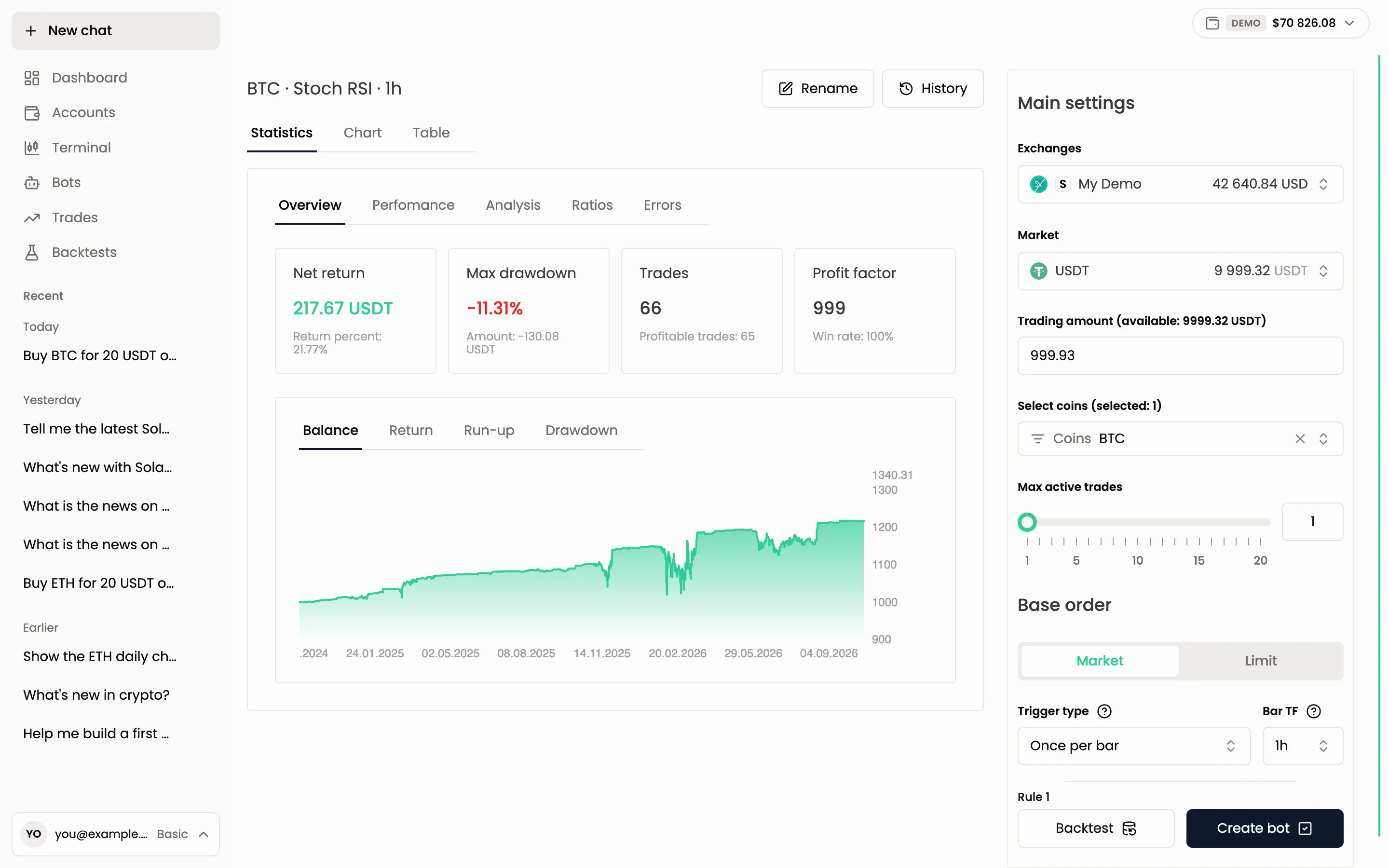
Open a run and you see its result with three views:
- Statistics: the numbers.
- Chart: the price chart with the entries, averaging orders, take profits, stop losses and liquidations marked on it.
- Table: every trade with its orders.
The Statistics view has five tabs:
| Tab | What is inside |
|---|---|
| Overview | Net return, Max drawdown, the number of trades with the profitable share, Profit factor with Win rate |
| Performance | Net return, gross profit, gross loss, commission paid, funding, enter and hold return, max run-up and drawdown, total slippage |
| Analysis | Average and largest win and loss, longest winning and losing streaks, average hours in trades |
| Ratios | Sharpe ratio, Sortino ratio, Calmar ratio, Win&lose ratio, Profit factor, Recovery factor. Hover the names for a short explanation |
| Errors | Errors of the run, if it failed |
Profit factor is calculated before fees and slippage, so it can be above 1 while the net result is a loss. Judge a run by Net return first.
Save, Rename, History
- Save keeps the run and asks you for a name. Once saved, the button becomes Rename.
- History opens the list of your runs so you can switch to another one.
Ask the agent instead
The agent runs backtests for you, explains the numbers and can compare several runs. A backtest needs no confirmation, because it touches no money. Saving it does.
Backtest buying BTC when RSI is below 30 and selling at +5%, for the last year
Compare my last three backtests and tell me which one is the safest
Next: Running a backtest, Reading results.
Still have a question?
Ask the agent in the app, or write to support in the chat at the bottom right.